

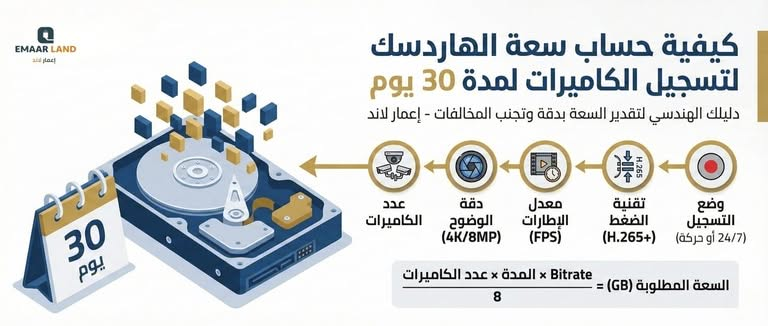
is considered CCTV Hard Drive is the digital repository that keeps all the details of your project or facility safe. Business owners in the Kingdom of Saudi Arabia often face a frustrating problem: discovering that recordings were automatically deleted before the required period ended, which may expose the facility to serious violations from regulatory authorities (such as the Ministry of Interior or the Civil Defense) that require many commercial activities to retain recordings for a period of no less than 30 days.
We at Emaar Land Company, we believe that “proper planning” begins with an accurate assessment of technical needs. In this guide, we will explain, in the language of numbers and engineering, how to calculate the storage capacity you need with great precision, and what factors cause the hard drive to fill up quickly or last longer.
Factors Affecting CCTV Camera Storage Capacity
Before starting the calculation, it is important to understand that storage capacity is not a fixed number, but the result of an equation influenced by five main factors:
1. Number of Cameras
It is obvious that a system of 4 cameras uses a quarter of the space of a system with 16 cameras, assuming all other factors remain constant.
2. Resolution
The higher the camera resolution (MegaPixel), the larger the volume of data it produces. A 4K (or 8MP) camera uses much more storage than a 2MP or 1080p camera.
3. Frame Rate (FPS)
The frame rate is the number of images the camera captures per second. Very smooth motion (30 frames per second) uses a huge amount of storage compared to 15 frames per second, which we often recommend for warehouses and offices.
4. Video Compression
This is the “secret” that saves you a lot of money. Modern technologies such as H.265+ compress video very intelligently without compromising quality, saving up to 50% to 70% of hard drive space compared to older technologies such as H.264.
5. Recording Mode
- Continuous Recording: The camera records 24 hours.
- Motion Detection Recording: The camera records only when motion is present, which saves a significant amount of storage, but it may not be acceptable under some security requirements for critical facilities.
Mathematical formula for calculating the hard disk capacity for camera recording
To calculate the required capacity in gigabytes (GB) for your surveillance system, we use the following formula:

Where:
- Bitrate: The amount of data the camera sends per second (depends on resolution and compression).
- 3600: Number of seconds per hour.
- 24: Number of hours per day.
- Days: Number of days required (in our case 30 days).
- 8: To convert bits (Bit) to bytes (Byte).
Solved practical example: calculating the capacity of one camera with 2 megapixel resolution
Suppose you have a 2MP camera operating at a bitrate of 4 megabits per second (4 Mbps) using H.265+ technology, and you want continuous recording for 30 days. Applying the formula is as follows:
Step one: Calculating the data volume per hour
4 Mbps × 3600 seconds = 14400 megabits per hour
Step two: Converting megabits to megabytes (dividing by 8)
14400 ÷ 8 = 1800 MB per hour
Step three: Calculating daily consumption
1800 MB × 24 hours = 43200 MB per day (approximately 42 GB)
Step four: Calculating consumption over 30 days
42 GB × 30 days ≈ 1260 GB, or approximately 1.26 TB for a single camera only.
By multiplying this figure by the actual number of cameras you have, you get the total required storage capacity with full accuracy, rather than relying solely on the approximate table.
Indicative storage capacity table (for 30 days)
Based on our experience in Emaar Land, here is an approximate table of the required capacity for a specific number of cameras at 2MP (Full HD) resolution using the smart compression technology $H.265+$:
| Number of cameras | Required hard disk capacity (30 days) | Recommended capacity to purchase |
| 4 cameras | About 1.5 to 2 TB | 2TB |
| 8 cameras | About 3.5 to 4 TB | 4TB |
| 16 cameras | Approximately 7 to 8 TB | 8TB |
| 32 cameras | Approximately 14 to 16 TB | 2 x 8TB |
Note: The figures above are approximate and assume continuous recording at medium quality. If 4K cameras are used, these figures should be at least doubled.
The Difference Between a Computer Hard Drive and a ”Surveillance Hard Drive”
A serious mistake some people make is using a regular computer hard drive (such as the green or blue Western Digital models) in recording devices. Here is why you should request a CCTV Hard Drive specialized one (such as WD Purple or Seagate SkyHawk):
- Continuous operation: Surveillance hard drives are designed to operate 24/7 for years, whereas computer hard drives are designed to operate 8 hours a day.
- Write speed: Surveillance systems perform “write” operations on about 90% of the data, whereas a computer performs more “read” operations. A specialized hard drive withstands the constant write load from several cameras at the same time.
- Reducing errors: Specialized hard drives include technologies that prevent frame loss during recording.
Cloud storage as an additional layer of protection
Local storage on a hard drive remains the primary choice for most surveillance systems due to its relatively low cost and its independence from a continuous internet connection. However, relying on it exclusively carries a real risk: the recording device may be completely damaged or stolen from its location, which would mean losing all saved recordings at once.
For this reason, we recommend Emaar Land By enabling cloud backup, even for selected clips only (such as critical security alerts), as an additional layer of protection that balances the monthly cost of cloud storage with ensuring critical evidence is not lost in emergencies.
Tips “Emaar Land” to save storage space and extend retention
If you want to keep recordings for 30 days or more on a limited budget, follow these strategies that we apply in our projects:
- Use H.265+ technology: When buying a recorder (DVR/NVR), make sure it supports this technology. It will save you from buying an additional hard disk.
- Enable artificial intelligence (AI) features: Instead of continuous recording, the camera can be set to record only “human movement” or “vehicle movement”. This reduces recording of tree or wind movement, which uses up space without any benefit.
- Reduce the frame rate (FPS): For offices and warehouses, a rate of 12 to 15 frames per second is more than enough to clearly capture events and saves a great deal of space.
- Define motion zones (Motion Masking): You can tell the camera to ignore a certain area in the frame (such as a public street with a lot of traffic) and focus only on your entrance door.
The role of “Emaar Land” in protecting your data
We at Emaar Land General Contracting, we do not stop at installing cameras; we carry out a “capacity study” before implementation. Choosing us ensures that you get:
- Accurate calculations: We guarantee that recordings are kept for the legally required period (30 days or more) according to your business activity.
- Genuine products: We exclusively use hard drives of the category designed for surveillance (Surveillance Grade), backed by the authorized distributor's warranty.
- Professional programming: We adjust compression settings and data rate (Bitrate) to balance image clarity with saving space.
- Large-scale storage solutions: For large projects that require hundreds of cameras, we provide RAID array storage systems that ensure no data is lost even if one of the hard drives fails.
Frequently Asked Questions About Calculating Hard Drive Capacity for Camera Recording
Q: Will the hard drive fill up and stop recording?
A: No. Modern recording devices are set by default to Overwrite mode, meaning that when the hard drive is full, the device automatically deletes the oldest day and records the new day in its place.
Q: What should I do if I need 90 days of recordings according to the requirements of a specific authority?
A: In this case, you will need either to increase the number of hard drives in the device (make sure your device supports more than one hard drive), or to use highly advanced compression technologies and slightly reduce the recording quality to fit the available capacity.
Q: How can I tell that the hard drive is working properly?
A: Recording devices emit an alert sound (beep) if the hard drive fails. You can also check the hard drive status from the settings menu on the device. At Emaar Land, we set up mobile alerts for you in case any storage fault occurs.
Don't leave your security to chance
Knowing how to calculate hard drive capacity is the first step to ensuring a successful security system that complies with the Kingdom's requirements. Losing a single footage at a critical moment could cost you a great deal, whether in a legal investigation or in material loss.
We at Emaar Land, we place our long experience in the contracting and security systems sector at your disposal to ensure your complete peace of mind.
Would you like an accurate calculation of the storage capacity required for your facility?
Contact us now, and our engineers will visit your site, provide technical consultation, and present a suitable quote.
📞 For direct contact: Tap here
🌐 Website: https://emaar.sa/
📍 Headquarters: Riyadh – and we proudly serve all regions of the Kingdom.